

Earlier, I explained how to mirror your operational data from Azure Cosmos DB to Microsoft Fabric and connect your applications for query analysis. Now, I’ll take it a step further and show you how to use DuckDB to analyze and visualize that data right in your browser.
DuckDB is an open-source relational database built for analytics. It runs directly inside your application, so you don’t need a separate server. You can quickly install it in Python, R, or Node.js and start using it right away. For this example, we’ll use the WebAssembly (Wasm) version, which lets DuckDB run in your browser and analyze data coming from Microsoft Fabric.
Browsers limit how much memory each tab can use. While the WASM version of DuckDB can handle up to 4GB, most browsers cap it at 2GB. If your data goes over this limit, DuckDB will crash since it can’t save extra data to disk. I don’t see this as a big issue, though, because 2GB is plenty for local analysis. I plan to work with smaller sets of data, like transactions from the last few hours or days, depending on the dataset size.
You can either download the WASM files or use a CDN. To make things simpler, I’ll use the CDN in the example below.
<!DOCTYPE html>
<html lang="en">
<head>
    <title>Duck DB WASM</title>
</head>
<body>
    <h1>WebAssembly Initialization</h1>
    <script type="module">
import * as duckdb from 'https://cdn.jsdelivr.net/npm/@@duckdb/duckdb-wasm@1.33.1-dev57.0/+esm'

let db = null;
let conn = null;

async function initDuckDB() {
const JSDELIVR_BUNDLES = duckdb.getJsDelivrBundles();
const bundle = await duckdb.selectBundle(JSDELIVR_BUNDLES);

const workerUrl = URL.createObjectURL(
                new Blob([`importScripts("${bundle.mainWorker}");`], { type: "text/javascript" }));
const worker = new Worker(workerUrl);
db = new duckdb.AsyncDuckDB(new duckdb.ConsoleLogger(), worker);

await db.instantiate(bundle.mainModule, bundle.pthreadWorker);
await db.open({ path: ':memory:' });

conn = await db.connect();
URL.revokeObjectURL(workerUrl);
}

initDuckDB();
</script>
</body>
</html>
This code loads DuckDB from the CDN and sets it up in the browser. Now we can load data into DuckDB. Here, we will connect to Microsoft Fabric, run a query, and get the data in Parquet format. I chose Parquet because I expect to receive millions of rows, and returning data as JSON would take too long to process. Parquet compresses data well and works better for analytics.
Next, I need an API endpoint to connect to Microsoft Fabric and get the data. I used Minimal APIs to create these endpoints in my app. The endpoints can take an optional timestamp parameter, which checks for new data if provided. Microsoft Fabric includes Azure Cosmos DB’s system properties, so you can use the _ts property to easily find new data.
app.MapGet("/api/questions-data", async (HttpContext context, long? ts) =>
{
    var connString = BuildFabricConnectionString();
    var rows = await FetchRowsAsync(connString, "DataModel4.PostDocs", ts);
    return await BuildDataResultAsync(context, rows, "questions-data.parquet");
});

app.MapGet("/api/user-data", async (HttpContext context, long? ts) =>
{
    var connString = BuildFabricConnectionString();
    var rows = await FetchRowsAsync(connString, "DataModel4.UserDocs", ts);
    return await BuildDataResultAsync(context, rows, "user-data.parquet");
});
The BuilDataResultAsync function takes your data, converts it into a Parquet file, and returns the result. If you want to see how each step works, you can find all the details in my GitHub repository.
I designed a user interface for developers. With it, you can quickly query the DuckDB using SQL language. For your regular users, you can easily display charts, or you can display raw data in a grid.
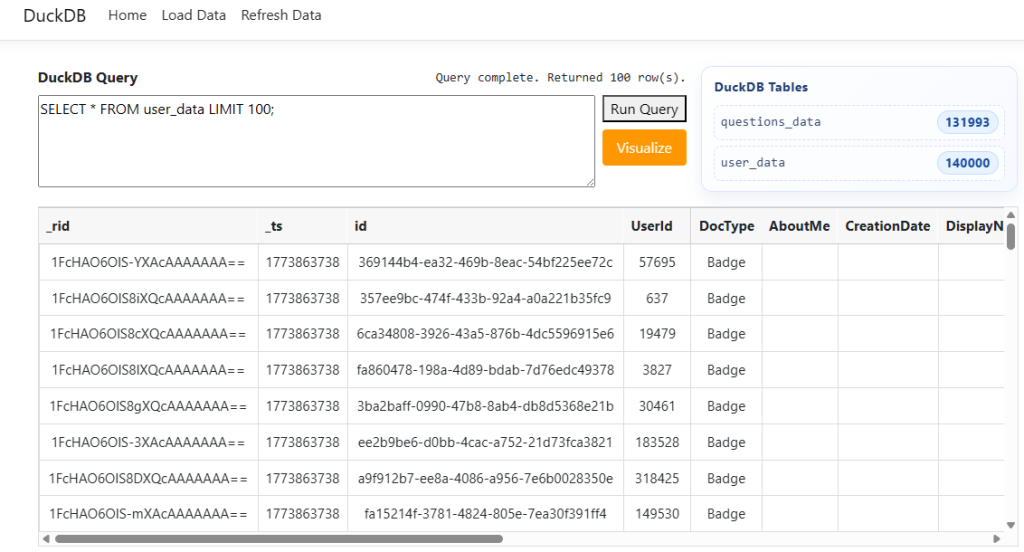
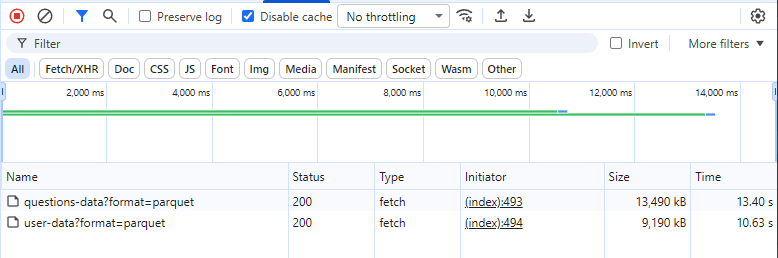
Click Load Data to run your SQL query and get data from Microsoft Fabric. The system pulls from two tables, and because it uses the Parquet format, the data is ready to query in about 12 seconds. The total data size in this example is around 172,000 rows across both tables. Keep in mind that the first time you load data, it may be slower due to a cold start on the Fabric side.
The refresh data button works manually by default, but you can set it up to run automatically every few seconds/minutes. It simply gets the latest timestamp from DuckDB and uses the same endpoint to find any new data since then. In the next example, I added more data and joined two tables to analyze the results.
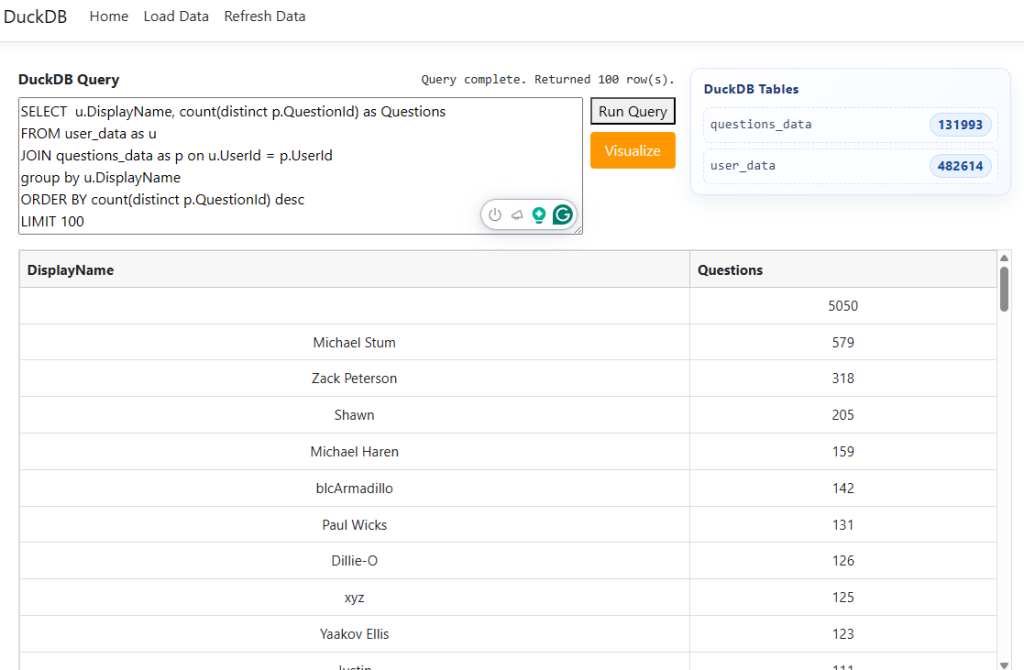
Azure Cosmos DB has some aggregation limitations, so you can’t run this type of query there. Microsoft Fabric offers many ways to analyze your Cosmos DB data. DuckDB also lets you work with data locally, making it easier to build affordable, flexible, and fast web apps that provide dashboards for your users.
I shared the working version on my GitHub. You will need to use your own Fabric SQL endpoint connection and database name in the BuildFabricConnectionString function to make it work.
static string BuildFabricConnectionString()
{
    // Replace with your actual Fabric SQL Endpoint connection settings.
    var servername = "";
    var dbname = "";
    return $"Server={servername};Database={dbname};Authentication=Active Directory Default;Encrypt=True;";
}
Leave a Reply