


In my earlier post, I covered how to mirror Azure Cosmos DB databases to the Microsoft Fabric. One of the biggest advantages of doing this is running your expensive analytical queries in Microsoft Fabric rather than in Azure Cosmos DB. Most of my analytical queries do not need the real-time data. I am fine analyzing older data, making business decisions, and acting on it. Most of us are not running a nuclear power station, so it is more than acceptable for business leaders and decision-makers to use non-real-time data to complete their jobs.
I have mirrored the Stack Overflow database’s Posts and Users tables. You can connect to Lakehouses and mirrored databases by using the Microsoft Fabric’s SQL endpoints. You will use T-SQL to query data from mirrored databases or files. Also, you will use the “Microsoft.Data.SqlClient” package to connect and run your queries.
Step 1:
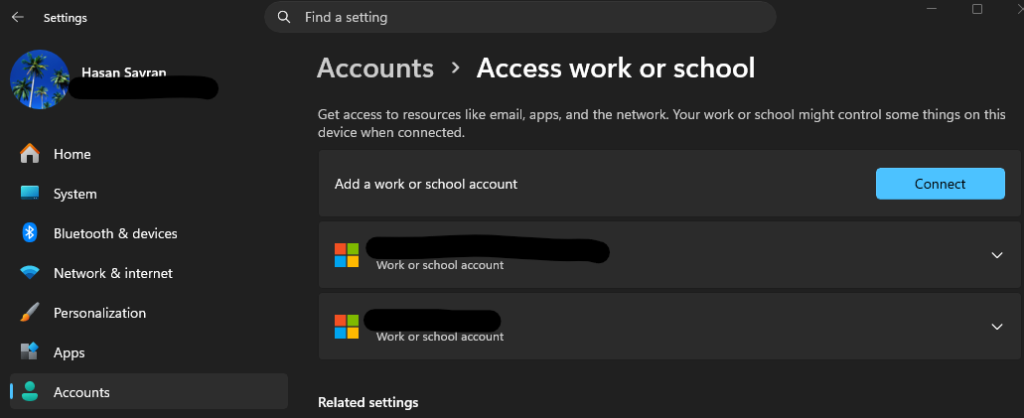
First thing you need to know is that you must use Microsoft Entra ID (formerly Azure Active Directory) authentication. You can’t pass username and password in the connection string. Adding your Microsoft EntraID to your computer is easy. Open the Settings (Windows Key + I) on your computer. Then click Accounts on the left side, scroll down, and find Access Work or School on the right. Check if you see your Azure account in the list. If it is not there, click on Connect and follow the instructions.
Step 2:
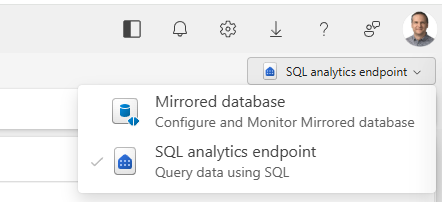
I will write a short .NET console application to demo how to run an analytical query in Fabric. The first thing we will need is the location of the mirrored database. To find the URL, go to https://fabric.microsoft.com, then locate your mirrored Azure Cosmos DB database, and click the SQL Analytics endpoint in the top-right corner.
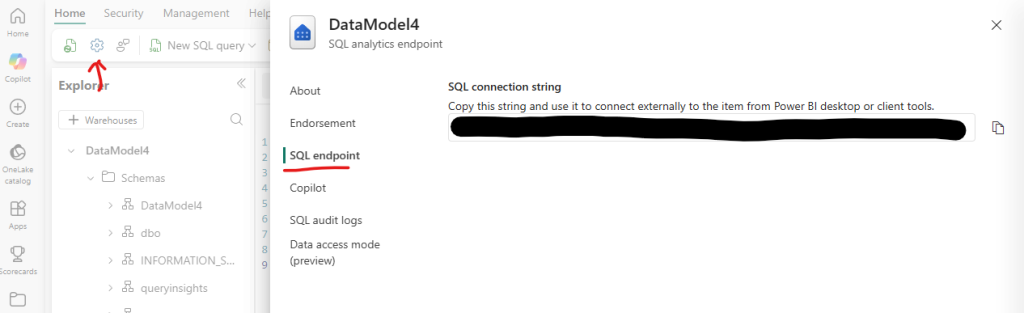
After SQL Analytics opens, click the Gear icon in the top-left corner to find the URL. Click on the SQL endpoint to view the URL required for your connection string.
Step 3:
I have two tables in Fabric, PostDocs and UserDocs, that are mirrored from Azure Cosmos DB. I am planning to run the following analytical query in Fabric. As you can see, I can JOIN tables and use different aggregation methods that Azure Cosmos DB does not support on the operation side.
SELECT top 100 p.UserId, u.DisplayName, count(distinct p.AnswerCount) as[NumberOfQ]
FROM DataModel4.PostDocs as p
JOIN DataModel4.UserDocs as u on p.UserId = u.UserId
WHERE p.Doctype = 'Question' and u.DocType = 'User'
GROUP BY p.UserId, p.AnswerCount, u.DisplayName
HAVING p.AnswerCount > 10
ORDER BY Count(distinct p.QuestionId) desc
Here is the code in my console application. You will need to paste the URL to the server name, dbname is the mirrored database name, and query is the analytical query you would like to execute. You may need to install the NuGet package “Microsoft.Data.SqlClient.Extensions.Azure” in order for Active Directory Default authentication to function properly.
using Microsoft.Data.SqlClient;

var servername = "";
var dbname = "";
var constring = $"Server={servername};Database={dbname};Authentication=Active Directory Default;Encrypt=True;";
var query = "";
using var connection = new SqlConnection(constring);
{
    try
    {
        connection.Open();
        using var command = new SqlCommand(query, connection);
        using var reader = command.ExecuteReader();
        while (reader.Read())
        {
            Console.WriteLine($"UserId: {reader["UserId"]}, DisplayName: {reader["DisplayName"]}, NumberOfQuestions: {reader["NumberOfQ"]}");
        }
    }
    catch (Exception ex)
    {
        Console.WriteLine($"An error occurred: {ex.Message}");
    }
}
Console.WriteLine("Completed! Press any key to exit.");
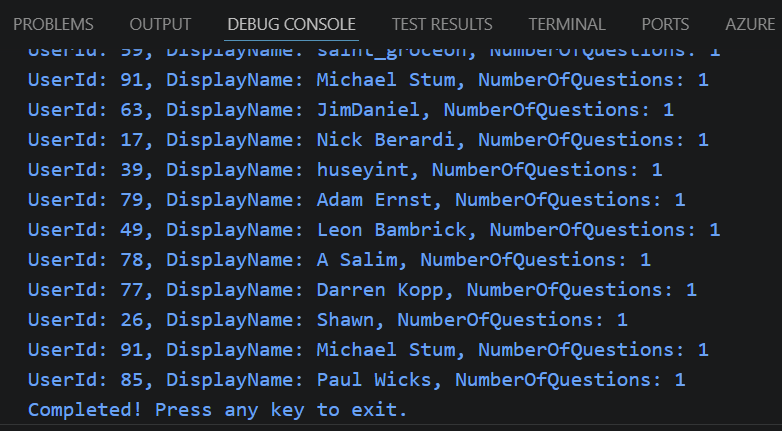
When I execute this C# code, it connects to the Microsoft Fabric, runs the query, and displays the data. You can run complex aggregations without worrying about Request Unit Cost
Leave a Reply